
FAQ & Client Guide
Launch & Access
Does an online server mean the official launch has started?
No. An online status indicates server availability, not the start of the announced launch. Use the date and countdown on Home as the launch reference. Pre-launch access may be used for testing; it is not an announcement of permanent public access or a guarantee that test progress will carry forward.
Which chapters are available at launch?
Chapters I and II are planned for launch. The current pre-launch server is capped at 1,999 rebirths; Chapter II is not currently accessible and requires a separate server release to lift that cap. Read Rebirth Chapters for progression details and Getting Started for your first character goals.
How old must I be?
Vanguard is for players aged 18 or older. Parental permission does not replace this requirement.
Installation & Connection
Use the supplied Vanguard client from Downloads. The custom interfaces and assets are part of the game experience; a generic Tibia client or another server's client is not a substitute. Create your account through Create Account.
The client will not open, or files appear to be missing. What should I do?
If the download is an archive, extract the complete package before launching it. Keep its executable, modules, data, and assets together; do not launch from inside a compressed archive or copy only the executable. Use a fresh folder rather than mixing files from different client versions. Follow the current download page for the supported package and launch instructions.
I can open the client but cannot connect.
Check the launch announcement and current server availability first. Confirm that you are using the current Vanguard download and the correct account credentials. If the error continues, report its exact wording and when it occurred. Never disable your antivirus or firewall globally to troubleshoot a download.
Client Panels & Settings
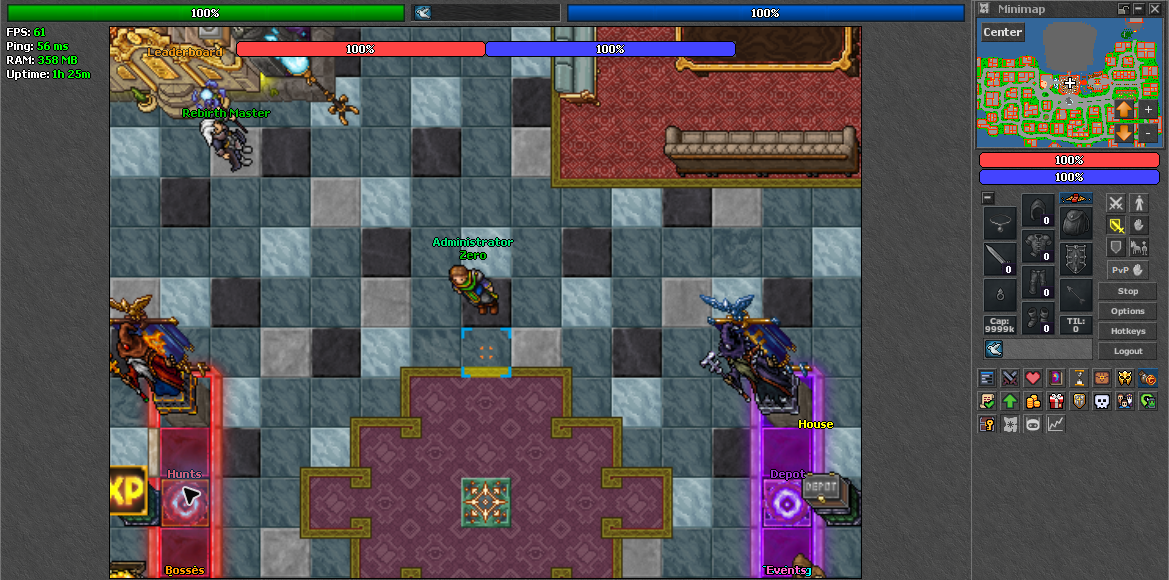
| Panel | What to Check |
|---|---|
| Progression | Current requirements, locked features, and your next progression goals. See Quests & Unlocks. |
| Quest Log | Quest objectives and recorded progress. |
| Tasks | Hunting assignments and task progression. See Tasks & Progression. |
| Weapon Forge | Weapon enhancement and material operations. Review Weapon Upgrade before confirming destructive operations. |
| Equipment and Spell Upgrades | Separate character upgrade paths with their own requirements and costs. See Tiers & Upgrades and Vocations and Spells. |
| AutoLoot | Your selected loot entries and available capacity. |
| Events | Event information and participation controls. See Events & Calendar for schedules and rules. |
| Guild | Guild membership, invitations, roles, and management according to your permissions. |
| Options and Hotkeys | Adjust your client preferences and action bindings before entering combat. |
Open the matching client controls to inspect these panels. A visible interface does not bypass a server-side rebirth requirement or grant access to a locked feature.
AutoLoot
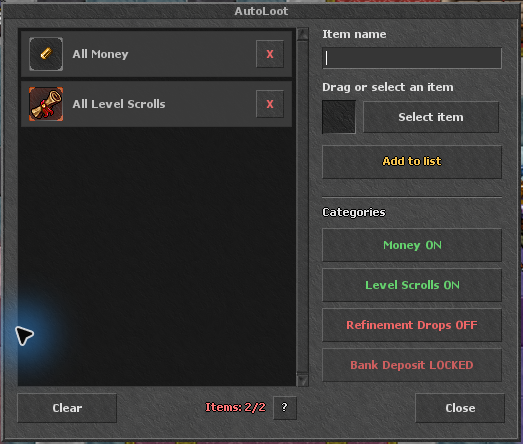
Open the AutoLoot panel or enter !autoloot. You begin with two base entries, can unlock two additional permanent entries, and receive one additional entry while VIP is active. Your available capacity is shown in the panel; enabling AutoLoot does not mean every item is collected automatically.
Add the items you want collected and review the list when your hunting needs change. See AutoLoot Basics for progression details.
Guilds & Invitations
The server-wide requirement is 50 rebirths to join a guild and 200 rebirths to create one. Guilds can also configure recruitment settings for their recruitment interface. A pending invitation still requires the server-wide joining unlock, and you must leave your current guild before accepting an invitation to another one.
Use the Guild panel for browsing and management. Enter !guild invites to list pending invitations, then !guild accept Guild Name to accept the intended invitation. Leaders and permitted officers manage recruitment and permissions through the guild interface.
Useful Player Commands
| Command | Purpose |
|---|---|
!autoloot | Open your AutoLoot configuration. |
!autoloot list | Show selected entries and slot information. |
!autoloot add item name | Add an item by name when capacity is available. |
!autoloot remove item name | Remove a selected item. |
!critical / !dodge | Inspect your gem progression. The displayed raw chance is subject to the combined limits in Combat & Attack Speed. |
!guild invites | List pending guild invitations. |
!guild accept Guild Name | Accept a pending invitation if all requirements are met. |
Automation, Trading & Account Security
Is automation allowed?
The supplied client's built-in bot and its normal automation are allowed. External bots, modified clients, and exploit abuse are prohibited. Permission to use the built-in bot is not permission to bypass game restrictions or exploit bugs. Read the Server Rules before playing.
When can I use the Market?
The Market unlocks at 250 rebirths. A feature unlock does not make every item tradable: bound items and other restricted resources remain subject to their own rules. Check Economy & Rewards before buying or transferring resources.
How do I protect my account?
Use a unique password, keep it private, and download only from the official website. Do not send passwords, recovery information, or payment details through chat or public screenshots. Staff support does not require you to disclose your password.
Support & Bug Reports
Join the Vanguard Discord for announcements and support. Include your character name, the affected feature, the exact error, the time, and reproducible steps. Attach a screenshot when useful, with private information hidden. Do not post an exploit publicly; report it privately to staff.